Labels

ad2

Showing posts with label Tips & Hidden PC Doings. Show all posts

Friday, 13 March 2015

Email Marketing Tips To Reach New Heights

Reach New Heights Through These Email Marketing Tips

Creating a successful marketing campaign using emails can be challenging. There are several things you can do to help ensure your next campaign is a success. This article contains many ideas designed to help you improve the quality of your email marketing. Use these suggestions to make an effective marketing tool.
Steer clear of renting or purchasing lists to pad your email marketing database. Not only do you not know if the emails you have purchased are truly your target market, but the lists can actually hurt your deliver-ability rates and ultimately your reputation. As much as possible, build your list organically.

When you are having your customers provide their email address to you during the sign-up process. Make sure that you have the clear disclaimer visible that you will be undertaking email marketing campaigns. Try to give the consumer an indication of how often you intend to make use of their addresses so that they are not unaware.
Don't send out emails without getting the permission of the person you're sending it to. If you start sending out what is considered spam, the results aren't going to be very good. It could go as far as people not desiring to do business with you any longer.

Thursday, 18 September 2014

How to see saved password from browser and how to prevent hacking

How to see saved password from browser and how to prevent hacking ?

Before we know that how to see and know the saved password in browser (chrome) and how to prevent hacking we should know that why browser saves us passwords ?
Programmers and webmaster knows that while developing a website there is a function of cookies() . The function of cookies is that when we check the button  Remember Password  cookies function becomes enabled.  And our password username and email  saved in our computer (client computer).  After that when we restart the computer and goes to the website  (whose Remember password is checked )  and tries to login the website  we don't need to input email and password again, We directly goes to the user control panel. Actually browser gets & reloads the input data(Email password) from cookies saved in our computer. The cookies folder is in C:/ drive by default.
Now we come to the main point that how can we see the saved password in browser (chrome).

It is kinda easy to see saved password from browser:
1- Open your browser, Go the  Top right corner under the exit button.
2- From these 3 lines go to settings.
3- After going to the setting change to URL from 
chrome://settings/  to   chrome://settings/passwords.
4- Here you will see all the saved password  of websites where you have enabled cookies. (i.e remember password).  And Clicking on Show you can see password. As described in picture below.


Beware !!! You could be hacked:

You could be hacked  if some hackers succeeded to insert virus to your computer through some links or downloads. Hackers steals your cookies in this way and get access to your accounts. 

Sunday, 20 July 2014

Make ShutDown And Restart Icon In Windows 8/8.1

Windows versions before window 8 were boring regarding shutting Down and Turn on time. These old versions took long time to shut down. But Window 8 overcome this problem and Fast Turn On and Fast Turn Off was enabled by advanced programming. 
But window 8 is also a problem for new users. As it has some different Interface. To turn off system they first need to go top right corner and then choosing setting and then power and at the  end Turn off. As already said this was a problem for new users. To overcome this Problem i am going to telling you a new method of fast shutdown and restart. 
This technique will create shortcut on your desktop and can easily turned off computer by just double-clicking.


Just follow these simple steps:
1- First of all Go to the Desktop screen.
2-Right click anywhere on the screen and From New-->Shortcut.

3-Now a window will open and will ask to select location of shortcut. Write this "shutdown -s -t 0 -f" and press Enter or go to next.
4-At the End it will ask to rename it. You can use by default name(ShutDown) or choose a custom name.
Hurrah!!! You have done! Now by double Clicking your System will turned off.
For making restart Shortcut, just modify 3rd step and

Thursday, 17 July 2014

Hidden Google Features And Tricks

Google is the top search engine since created. Searching in google is amaze worthy as it tells us the right things that we need. It search's algorithm are panda etc. It crawls all website data and shows result to the relevant query. Its interface and homepage is very unique and simple. it shows all type of search results like PDF, definition , convertor and much more in less query time.
 But i want to tell you a new thing that you should try. It is only for fun and looks cool . Go to the link and enjoy new feature that you have never seen before.
Guitar play: This is my favourite thing. as you can play guitar online and can make a melody for your friends, love and also can learn how to play it. Must see this.Guitar.

Google Mirror: You will see the mirror view of the google homepage. Google Mirror
Bing Mirror: works same as Google Mirror. Bing Mirror

Some other interesting Google magics are below:

Wednesday, 16 July 2014

How To Set-Up Google Analytics

Google Analytic is the service provided by the Google services to measure your website. It is a free tool for SEO and related topics for webmasters. By analytic you can measure your website in the way that you will be able to know real time visits of your website as well historical data to measure user/visitors and can well analyze previous and current website state. You can also know traffic from countries, cities and much more. But how to use this free and amazing tool?
Its quite easy ! Just follow steps.
1-Go to Google Analytics Google Analytics.
2.SignUp here, if have already Gmail account then just sign in to your gmail account.
3. when you will do this, you need to add your website. Accept the terms and services condition and go on.
4. You will given a java code to put into your website's head tag. Also read instruction while setting up analytics.
5. Go to Website HTML , place the code in the head tag (of every page) and save it. Its done!!!

Again go to your analytics account and see the result, in real time you will see the current visits of your website. you can check all the previous data from calendar to see users visiting trend. And can improve website. If you are running a campaign you can send emails of traffic to your workers as well. Its cool and amazing tool for free provided by the Google.

Sunday, 6 July 2014

How To Add Sitemap Of Your Website || Blogger

Google and other search Engines like Yahoo( Bing) search for your web which is called Crawling. Google and Bing Robots crawl your website after some time but on regular basis. Some times search engines does not find all the pages of your website. That results in low traffic and hidden from user search in Search engine.

Solution to this Problem is that: We add a sitemap. But!!! What is sitemap :O ??
Sitemap is like a directory of your website can say about a blogger. All search engines like Google , Bing searches sitemap and crawl all your pages from that sitemap. So, now make a sitempa of your website. That is quite easy.
First of all go to Google Webmaster Tool or Bing webmaster Tool.
Sign in There and add a sitemap of your site. And Now,
You can make sitemap by just pasting this XML code in your Webmaster Tool. Code is Below ;)


Thursday, 3 July 2014

SEO Check the Whole Posts Of A Website In Search Engine

How to check that what Google, Bing etc knows about the pages of your website.

When a web developer or can say web owner publish a post then the main focus is only on the traffic on that link/post. Traffic can be generated from many ways like traffic from Google+ , Facebook , twitter or any social media. All these are organic traffic. But the most necessary thing is that , our web should be in Google
search. And should be on top of the search query.
Google and other search engines Crawl the website and knows about the webs new post/pages etc. But some time when a developer searches in the Google he does not find some URLs post of his web.
Now question is how to check ALL POSTS of a WEB  in any search engine.
That's quite simple :)
Just write this in search Area.
Site:Website.com
Or as an example, Let say
Site:Easylinkx.blogspot.com
Now, you can see in search engine that all the posts are here that any search Engine crawled.
If You observe that some posts are not in search  then you can have an option/ solution for that.
Solution:
will be published Soon :)


Tuesday, 3 June 2014

Facebook Secrets

Secrets of Facebook.  

3 Facebook secrets will be learnt.
1-Turn On chat with Custom friends.
2-Video call from Facebook
3-Group chat on Facebook

1-Turn on Chat with few friends.

Many Facebook users don't know the some hidden things, but are necessary sometimes. The first one is how to chat On/ Chat Off with custom friends. 
on  right side of slide bar click on the Wheel of setting.
Then click on advanced setting.
You will see a menu that will ask you to either "Turn on Chat all friends Except ". 
Or "Turn Off Chat all friends Except". Or 3rd one is turn off chat to all .
From top two options you can set chatting ON/OFF to custom friends.


Sunday, 20 April 2014

How to Use USB Drive As RAM ( Steps with Pictures)

Steps with pictures to use USB as RAM.

When we run a program it first loads in RAM(random access memory). We use many programs that use memory in MBs & results in slow  of Computer running , sometimes causes halt of PC . We increases the Computer  speed by increasing RAM size. So. our computer speeds up. To day i am telling you a new and tricky method to increase your RAM size i.e increasing your systems speed. MAKE YOUR USB YOUR RAM.

Just follow these Steps.
1- Attach USB drive with Laptop/PC
2-Format your flash drive(there should be no data). USB should not be less than 2 GB
3-Go to Computer Properties.

Thursday, 17 April 2014

How to download video from Facebook, Youtube

How to download video from Facebook, Youtube.
Download videos from facebook & Youtube easily. Just with one click.
Its So simple:
1- Just play video on Facebook.Com or Youtube.Com
2- Now copy the URL( address of video)

3- Open this website
4-Paste the URL here.
5-Now right click on the Bar and click on "Save link As ";
6- At last Rename the video and click on save.
That's all. 

Thursday, 10 April 2014

Multiple Facebook accounts at a time

Mostly people share there computer or laptop  and both of them want to use facebook. but when they open a new tab to open a new account they observe that previous account is open. So, i am telling you that how to open multiple accounts at a time on single pc.
That's so simple. just press Ctrl+shift+N
And you  you will see that a private window will open.
 Open facebook.com and Log in . Now you can open 2 acounts. Similarly if you want to open more than two accounts simultaneously then use multiple browsers and open Private windows to open multiple acounts.

Sunday, 6 April 2014

Write Flip Text on Facebook

Facebook is a large social media network connecting all the world. A user can send IM(instant messaging), photos, videos, thoughts, share feelings and send other material to their friends and family  & to their lovely relationship. Users of facebook likes photos, videos and also comments on posts made by others. These kinds of doings tells your  presence on worlds largest social network Facebook.
But users demands something new on facebook & Facebook owners and employees tries daily to improve and maintain facebook.
Today i am telling you a something different i.e        writing flip text. Yes! its possible & simple like eating mango :D  
Know what is flip ?
Example : Hey !! Whats up ?
¿ dn sʇɐɥʍ ¡¡ ʎǝɥ
Follow simple steps...!!!
Go to the link below and in the box write your  Phrase. It will be  flipped.

Saturday, 22 March 2014

Delete you data permanently without any sotware

Computer makers always try to facilitate people . Every one has their own personal data & he never wants to share it with any One. Some times he deletes files and these files goes to recycle bin , from where he can recover their files. Then people delete these files from recycle bin and gets relaxed that they have deleted their data permanently. But for their kind information it is telling you that your Data is not permanently deleted and it is somewhere in  your hard Disk. And can easily be recovered with any recovery software. The  most important data of person is their family pictures.
Now i am telling you that how can you delete your pictures permanently from hard disk, so that it can not be recovered again. 
Just follow these steps.

Thursday, 13 March 2014

How to double your internet speed

100% working method to increase your internet speed.......!
Hey guys Do you want to double your internet speed , want to make your Internet speed 2X. Then this tutorial will help you . If you are having two internet connections i.e if You have wired (DSL) internet connection and Wireless(WiFi) connections then you can use both of your internet connections to make your internet speed 2X. Mostly people have two internet connections because in this modern age its basic need of every person to have internet connections ON 24/7  But occasionally people don't know to join these two internet connections to make their internet speed two times faster.


 In this tutorial you will get to know that how is this possible. i am just giving you a software which names Connectify Dispatch . Install this software and add-up your internet connections to make your internet speed Double. Keep Enjoying :)

Wednesday, 19 February 2014

How To change Wifi Password

This is how you can change your wifi password to make it secure and to take it in your hands. just follow simple and easy steps to change password.

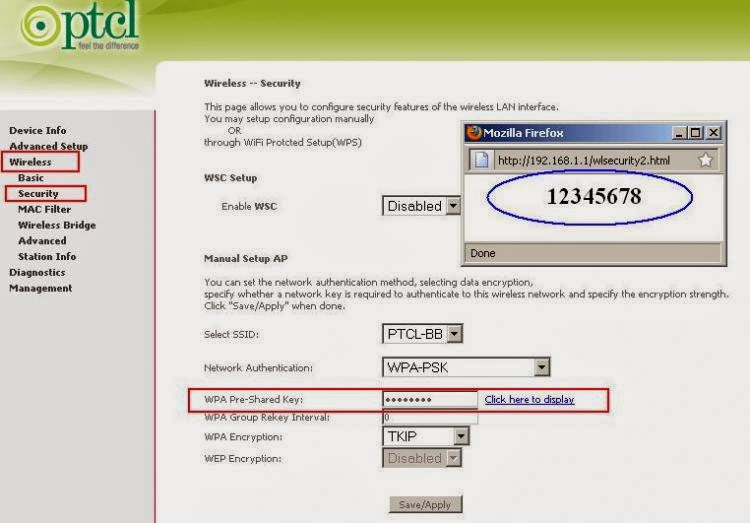
1- Go to your browser, and Type  192.168.1.1  in the address bar of your browser.
2- After pressing Enter you will see a new window opened.
3- Enter ADMIN as your username and password. This is by default ID and Password.
4- Now click on advance setting button
5- Then goto wireless tab. This is the place to make changes
6- Now  see the 4th last button on  your screen from wireless tab.
7- 12345678 is your by default password. You can change it from here.
8- After changing you can sae it.

That's the story. Now you have changed password of your own choice.
You can also change your admin access password going to the management tab.

Saturday, 8 February 2014

Temporaty Email 10minutesmail

10 minutesmail is a mailing site that makes a temporary E-mail address and destroys itself after 10 minutes. You may increase time by your own choice. Its  very simple. Its major benefit is that Some times we want to sign up at any media about that we are not  trusted or we don't want to give our  private email address due to security reasons. At that time it becomes a hurdle in way of progrssing next. But using this easy tool you can sign up easily and without hesitation.
Its main feature is that you can make unlimited ID's and in very short time without giving personal Data.
The link is below.


If you want to verify Your account as required by medias. You can Verify it by going to Inbox.

Enjoy Cool Tricks.

Wednesday, 5 February 2014

How to Hide Exe file behind Image

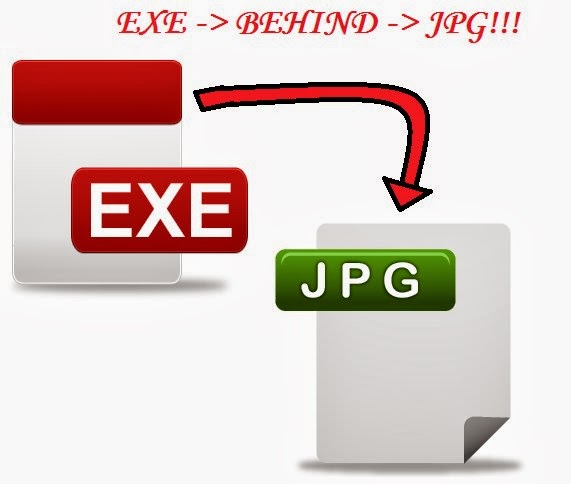
How to hide any file behind the picture ?
That's simple than your thoughts .
Follow simple steps
:

1) Open Command Prompt from start
2) Using  [cd ..]  Command go to  the destination where image and file is placed.
         For your easiness , i suggest you to place both(image & file ) in C:\ drive .
3) When you have reached the Directory where file are placed  Write these Commands

 copy /b  image.jpg + filename.txt   name_of_newfile.jpg


Note: Make sure that imagename and filename and new file creating must have their Extension (e.g  jpg, txt).
 4) Then Press Enter. and you will see that an image is created in your folder (where both files were placed before).

Now , you can send file to anyone with secret behind it.

Friday, 31 January 2014

Download torrent with IDM

Hey, are you worrying about downloading a huge file through BitTorrent or Utorrent ?
Torrentz downloading depends upon many things that slows down your downloading speed. Mostly a Movie may take a whole day to download from torrent. Internet Downloader Manger (IDM) is the best software to download Data faster and easily. It only depends upon your internet speed and not on Peers , packets etc.
and people like to use IDM .
But Question is how to download a torrent with IDM ? ? ?
Its simple than your thinking . Keep smiling :)
1- Download torrent (few kbs)
2- Open this web

Sunday, 19 January 2014

Facebook Smileys

Hey guys , want some more on Facebook.com ? have you bored with old smily on facebook ?
I am telling you more smileys on facebook chat i.e new smileys in chat that you have never seen .
So, write simple codes in chat box and make some thing different than your friends.


[[f9.heart]]                   LOVE                                         [[f9.heartbreak]]          HEART BREAK

[[f9.lying]]                    LYING                                       [[f9.rosedown]]             ROSE DOWN

[[f9.pizza]]                   PIZZA                                         [[f9.rain]]                     Rain

[[f9.rofl]]                     ROFL                                          [[f9.silly]]                     SIlly

[[f9.shutmouth]]          ShutMouth                                    [[f9.sleepy]]               SLEEPY

[[f9.tongue]]               Tongue                                         [[f9.Party]]                 PARTY

[[f9.wine]]                  WINE                                           [[f9.ring]]                    RING

Monday, 13 January 2014

Magic In VLC Media Player

VLC is the Media player that is alomost in every one's use. It is famous for its good interface and freatures like  Playing everything , Streaming, devices, Discs, webcams etc. It supports all types of video and audio formats like Mp3, Mp4, FLV,Mkv, Mpg, wav and  much more. It runs on all platforms like Windows , Linux, unix etc. And most likely is that it is free of cost.

Today i am going to tell you an interesting trick that no one knows.
Just follow simple steps and enjoy VLC VideoLan
1- Open VLC Media player
2- Then Press CTRL ,hold it and press N (Ctrl+N).
3-Now a new window appers.
4- Write [screen://]